10 Best Wi-Fi Chicken Coop Doors (October 2026)
The best Wi-Fi chicken coop doors include the CHAMUTY Wi-Fi Camera Coop Door for camera checks and alerts, the MASTERFUN Wi-Fi Camera Door for remote check-ins, and the Omlet Smart Wi-Fi Coop Door for smart-home control.
On this page (5 sections)
The CHAMUTY Wi-Fi Camera Coop Door is the best Wi-Fi chicken coop door for keepers who want a camera, motion alerts and app scheduling in one unit. For smart-home control without a camera, consider Omlet or JVR.
A Wi-Fi door can let you check status or change a schedule from your phone, but features differ. Some models add live video and alerts, while others focus on opening routines, voice control or solar power.
If you're still comparing door types, start with our guide to automatic chicken coop door openers. Check your entrance measurements with the coop door sizing guide before choosing a model.
Our picks at a glance
-
1

-
2
 Best for remote check-ins
MASTERFUN Wi-Fi Camera Door, Night Vision
8.7/10 our score
See it on Amazon -
3
- 4
 Check it
MASTERFUN Wi-Fi Solar Camera Door
Best for camera and two-way audio - 5
 Check it
JVR Wi-Fi Coop Door with Alexa
Best for Alexa without a camera - 6
 Best for flexible phone controlCheck it
 - 7
 Best for upward-opening designCheck it
 - 8
 Check it
Azureblom Camera Solar Coop Door
Best for hotspot camera access - 9
 Check it
Aiwaylar Camera Wi-Fi Coop Door
Best for roll-up camera monitoring - 10
 Best for checking door statusCheck it
The best Wi-Fi chicken coop doors for different needs
The CHAMUTY ranks first for its combination of camera viewing, motion alerts and app scheduling. The other picks suit different priorities, from voice control to hotspot access and upward-opening hardware.
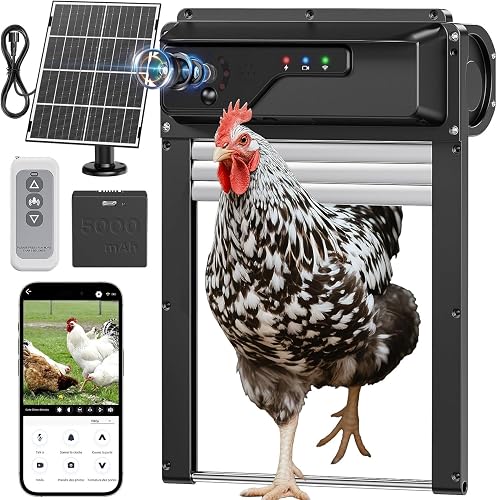
CHAMUTY Wi-Fi Camera Coop Door: Best for camera checks and alerts
- 1080P camera with night vision
- iWFCam app and shared access
- 7W solar panel and 5000mAh battery
- Anti-pinch reversal
A camera, motion alerts and app scheduling bring monitoring and door control together. Solar charging and USB backup offer two power options.
Pros
- Camera with night vision
- Motion alerts and alarm
- App schedules and shared access
Cons
- Wi-Fi requirements need confirmation before setup
- Roll-up opening needs a suitable coop layout
CHAMUTY combines a 1080P camera with night vision and Wi-Fi app control. You can view live video through the iWFCam app, set opening and closing schedules, and share access with family members.
The built-in motion sensor can send app notifications, and the door includes an alarm function. Its 7W solar panel charges a 5000mAh battery, with USB charging available as backup.
The roll-up design needs less swing space than a hinged door. Its anti-pinch function is designed to stop and reverse when the door meets resistance while closing.
Choose this if seeing the coop and receiving movement alerts matter as much as remote door control. Before installing, confirm Wi-Fi coverage at the coop and measure the opening against the unit's dimensions.
MASTERFUN Wi-Fi Camera Door, Night Vision: Best for remote check-ins
- 1080P camera with night vision
- Remote operation and door status
- 7W solar panel and 5000mAh battery
- Two-way talk
Remote control, schedules, door status and two-way talk suit owners who want several ways to check in. The solar panel and USB option cover different power setups.
Pros
- Two-way talk and shared access
- App status and remote control
- Anti-pinch reversal
Cons
- App connection depends on Wi-Fi
- Confirm the opening dimensions for your coop
MASTERFUN suits keepers who want app control plus ways to check in beyond a status indicator. Its camera offers live viewing and night vision, while the app supports remote operation, schedules, door status and shared access.
The built-in talk feature adds two-way communication. The solar panel and 5000mAh battery have USB charging as a backup, and a remote control can operate the door nearby.
Anti-pinch reversal is designed to respond when the door meets an obstruction while closing. The roll-up design also avoids the clearance needed by a swinging door.
Choose this when remote viewing and two-way talk are useful for your routine. Check signal strength at the coop and confirm the opening fits before installing.
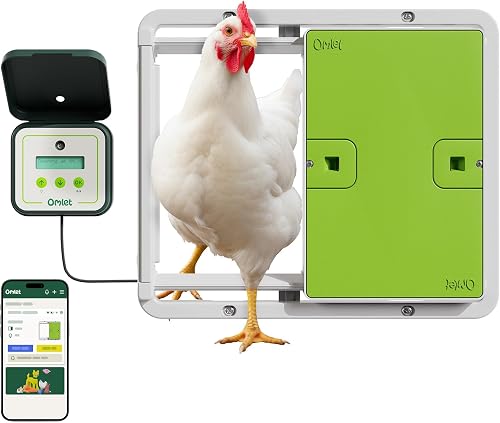
Omlet Smart Wi-Fi Coop Door: Best for smart-home control
- App control and notifications
- Alexa and Google Home compatibility
- Light sensor or timer
- Battery or plug-in power
Omlet combines app monitoring with Alexa and Google Home compatibility. A light sensor or timer lets you choose daylight-based or fixed operation.
Pros
- Alexa and Google Home compatible
- Obstruction sensors
- Battery or wired power
Cons
- 12V power cable sold separately
- Camera not included
Omlet is the clearest fit if you want a Wi-Fi door that can also work with Alexa or Google Home. It provides app control and notifications, plus a choice between a light sensor and a timer.
The door can run on 4 AA batteries or a wired connection. Omlet says the casing is weatherproof to IPX6 standards and tested to -4°F.
Built-in safety sensors stop the door when they detect an obstruction. This model does not include a camera, so choose it for door control and scheduling rather than video checks.
Before buying, check the mounting layout and power option that suit your coop. See our Omlet automatic door review for a closer look at its setup and controls.
MASTERFUN Wi-Fi Solar Camera Door: Best for camera and two-way audio
- Camera with live view
- Two-way audio and photo capture
- 5000mAh battery and solar power
- App schedules and motion alerts
Live viewing, two-way audio and photo capture give this camera-equipped door several monitoring tools. It also supports solar, battery and direct power.
Pros
- Two-way audio and shared access
- Motion alerts and alarm
- Multiple power options
Cons
- Requires a 2.4G Wi-Fi network
- Confirm camera storage needs before buying
This MASTERFUN model pairs app control with camera features including live view, two-way audio, photo capture and video recording. Its app also supports schedules, door status and shared access.
The 5000mAh battery can be charged by solar power or direct power. Motion detection and app alerts add another way to notice activity around the coop.
A key setup detail is its 2.4G Wi-Fi requirement. The camera supports TF cards up to 128GB for storage, but the card is not included.
Choose it if two-way audio and recording options matter to you. Check your router signal where the door will sit and decide whether you need separate video storage.
JVR Wi-Fi Coop Door with Alexa: Best for Alexa without a camera
- Tuya app control
- Alexa and Google Assistant compatible
- Sunrise and sunset scheduling
- 11 in wide by 12 in high opening
JVR focuses on app and voice control, with sunrise and sunset scheduling. Its stated opening size helps you compare it with your coop before installation.
Pros
- Alexa and Google Assistant compatible
- Sunrise and sunset scheduling
- Anti-pinch reversal
Cons
- Needs a stable 2.4GHz Wi-Fi connection
- Camera not included
JVR provides app control and supports Alexa and Google Assistant, with sunrise and sunset scheduling. It has no camera, so it fits buyers who want remote door operation and voice commands without video monitoring.
The stated opening measures 11 in wide by 12 in high. Its 12V DC power requirement and minimum Wi-Fi connection make power access and signal coverage important parts of planning.
JVR also describes anti-pinch reversal and a setting for door behavior after power returns. The door is compatible with 2.4GHz Wi-Fi.
Choose it if voice control and daylight scheduling matter more than a camera. Measure the opening and check that a suitable 12V supply is available at the coop.
SMILE FOREST Wi-Fi Solar Door: Best for flexible phone control
- App control by Wi-Fi or hotspot
- Timer, light sensor and manual modes
- 8000mAh battery and solar panel
- Direct phone control nearby
Several control modes and a larger stated battery capacity suit buyers weighing different power and connection options. It has no camera, so monitoring centers on door status and operation history.
Pros
- Wi-Fi and hotspot setup options
- Timer and light-sensor modes
- Solar and DC power options
Cons
- Camera not included
- Confirm the door opening dimensions
SMILE FOREST offers app control through Wi-Fi or hotspot during setup, along with nearby direct phone control. Its operation modes include timer, sunrise and sunset sensing, and manual control.
The 8000mAh battery works with a solar panel, and the door also supports direct DC power. The app can show door status and operation history, but this model does not include a camera.
The maker describes an adjustable anti-pinch system and a safety lock intended to prevent accidental button presses by predators. For pairing, its guidance recommends 2.4GHz Wi-Fi.
Choose it if you want several control options and a larger stated battery capacity. Confirm the entrance dimensions and the connection mode you plan to use.
Ortis Wi-Fi Solar Coop Door: Best for upward-opening design
- GeniLife app control
- Solar panel and 2000mAh battery
- Timer and light sensing
- Upward-opening door
The upward-opening door may suit a coop where a roll-up or downward-opening door is awkward. App control, timer and light sensing cover common scheduling needs.
Pros
- Upward-opening design
- Solar power with built-in battery
- Timer and light-sensing modes
Cons
- Camera not included
- Check fit around the coop roof and overhang
Ortis stands apart with an upward-opening, frameless design. That layout may fit a coop where a roll-up door or swing clearance is awkward, and the app supports remote control, timer and light sensing.
The door uses a solar panel with a built-in 2000mAh battery. Ortis also describes LoRa communication for remote management, but check which connection options are available in your intended setup.
Its stated weather range is -4°F to 140°F, and the frame is rated IP65. There is no camera, so the main draw is the door design and scheduling options.
Choose Ortis when the upward-opening mechanism suits your coop structure. Check the roof, overhang and opening area so the door can move freely.
Azureblom Camera Solar Coop Door: Best for hotspot camera access
- 1080P camera with night vision
- Wi-Fi or mobile-hotspot app control
- 5000mAh battery and solar panel
- Anti-pinch infrared sensor
Wi-Fi and mobile-hotspot app options give this camera door more than one connection route. Its 5000mAh battery can charge by solar panel or USB-C.
Pros
- Hotspot app option
- Camera with night vision
- Several control modes
Cons
- Confirm connection behavior for your setup
- Check opening dimensions before installation
Azureblom combines a 1080P camera with night vision and app control. It describes two connection options: Wi-Fi for remote control, or a mobile hotspot through a separate app when Wi-Fi is weak or unavailable.
A 5000mAh battery can charge through the solar panel or USB-C. The door also supports timer, remote and manual control, with an infrared anti-pinch sensor.
The camera can be viewed through the app or a memory card. Its description mentions an alarm when the temperature-sensing device detects activity, so check the setup instructions to understand how that feature works.
Choose it if the hotspot option fits your coop's connection needs. Confirm how you plan to view or store camera footage before buying.
Aiwaylar Camera Wi-Fi Coop Door: Best for roll-up camera monitoring
- 1080P camera with night vision
- 2.4G Wi-Fi app control
- 7W solar panel and 5000mAh battery
- Roll-up design
A camera, app schedules and a roll-up door combine remote viewing with automatic operation. The maker recommends a 13.3 x 8.8 in entrance.
Pros
- Camera with night vision
- Solar and plug-in power options
- Anti-pinch reversal
Cons
- Requires 2.4G Wi-Fi coverage
- Confirm the entrance size against your coop
Aiwaylar suits a roll-up setup where camera viewing and solar charging are priorities. Its 1080P camera supports app monitoring, and the system can use a memory card up to 128GB for recordings.
The door uses a 7W solar panel and a 5000mAh rechargeable battery, with plug-in power also available. Its app supports scheduled opening and closing, while the camera includes night vision and an alarm function.
Aiwaylar specifies 2.4G Wi-Fi coverage and recommends a 13.3 x 8.8 in entrance. Its anti-pinch feature reverses when it detects an obstacle during closing.
Choose it if those dimensions suit your coop and you want camera monitoring in a roll-up format. Check signal strength and make room for the solar panel where it can receive sunlight.
SARELLIT Tuya App Coop Door: Best for checking door status
- Tuya app door status
- Schedule or light-sensor operation
- 4000mAh battery and solar charging
- Anti-pinch reversal
SARELLIT emphasizes app-based open and closed status without adding a camera. Solar charging and USB charging give you two ways to power the control unit.
Pros
- Door status in the app
- Solar and USB charging
- Wi-Fi auto-reconnect
Cons
- Camera not included
- Check the entrance size and mounting space
SARELLIT focuses on knowing whether the door is open or closed through the Tuya app. It does not include a camera, which makes it a simpler option if status checks matter more than video.
You can schedule operation or use light-sensor mode. The removable control unit has a 4000mAh battery, and it can charge with the included solar panel or USB.
The door is designed to reverse when it detects an obstruction and retry after a short pause. SARELLIT also describes Wi-Fi auto-reconnect attempts if the connection drops.
Choose this for app-based door status and solar charging without camera features. Measure the entrance and check mounting space before installation.
How we compared Wi-Fi chicken coop doors
We compared app control, monitoring features, power choices, door styles and the information available for fitting each unit. Our score weighs specs, features and buyer feedback against what you're shopping for.
Camera-equipped doors rank higher when they combine live viewing with useful controls or alerts. A camera alone does not guarantee a strong Wi-Fi signal or make a coop secure, so plan for physical predator protection as well.
Doors without cameras can still be good choices if you mainly want status checks, scheduling or voice control. We also considered whether a model names its power options and gives useful opening or mounting details.
Which Wi-Fi door features matter most?
Choose features that solve a real part of your daily coop routine. App access can reduce trips to the coop, while camera viewing, alerts and backup power address different needs.
Is a camera useful on a Wi-Fi chicken coop door?
A camera is useful when you want to see the coop or check activity remotely. CHAMUTY, MASTERFUN, Omlet's camera models, Azureblom and Aiwaylar include camera features, while JVR, Ortis and SARELLIT focus on door control or status.
Night vision can help in low light, but it doesn't replace a secure run, sound installation or regular checks. Check whether footage is live only or can be saved, and whether storage needs a separate memory card.
Should you choose app control, a timer or a light sensor?
App control is useful when you want to check status or operate the door remotely. A timer follows a set schedule, while a light sensor or sunrise and sunset mode can follow changing daylight.
Some models offer more than one mode, giving you flexibility if your flock's routine or coop location changes. Confirm whether schedules need an active Wi-Fi connection and what happens if power or signal is interrupted.
What power backup does a solar door need?
A solar door with battery or USB backup gives you another option when sunlight is limited. CHAMUTY, MASTERFUN and Azureblom include rechargeable batteries and USB charging, while Omlet offers battery or wired power.
Panel placement affects how much sunlight it receives. Check the charging instructions, cable reach and backup method before mounting the unit.
How do you check Wi-Fi coverage at the coop?
Check signal strength where the door's control unit will sit, with the coop door closed and nearby obstacles in place. A weak signal can affect app access, notifications or setup.
Some models require a 2.4GHz network. If the coop is far from your router, test the connection first and consider a suitable extender only if your network supports it.
How do you install a Wi-Fi chicken coop door safely?
Start by measuring the opening and checking the door's mounting dimensions against the coop. Then follow the instructions for the specific model, especially for wiring, solar-panel placement and sensor setup.
Keep the entrance clear of bedding, debris and obstructions that could affect movement. Test the door's opening, closing and safety response while present, and confirm the chickens can pass through comfortably.
For a step-by-step overview, read our guide on installing an automatic chicken coop door. If you're still planning the rest of the structure, the backyard chicken coop guide covers size, build, run and door choices.
Which Wi-Fi chicken coop door should you choose?
Choose CHAMUTY if you want app scheduling, a camera and motion alerts in one roll-up door. Pick Omlet for smart-home compatibility, JVR for voice control without a camera, or SARELLIT if checking open and closed status is enough.
Before choosing, measure the opening, check Wi-Fi at the coop and decide how you'll power the door. Then match the camera, scheduling and backup options to the routine you want to simplify.
Our top 3 picks at a glance
-
1
-
2
Best for remote check-ins
MASTERFUN Wi-Fi Camera Door, Night Vision
8.7/10 our score
See it on Amazon -
3
Frequently asked questions
Do Wi-Fi chicken coop doors need internet?
It depends on the model and the feature you want. Some doors require a stable Wi-Fi connection for app control, while SMILE FOREST also describes nearby direct phone control and Azureblom offers a mobile-hotspot app option.
Check whether schedules and door operation continue if the connection drops.
Is a camera necessary on a Wi-Fi coop door?
No. A camera helps you view the coop or its surroundings, but a door-status app can answer the simpler question of whether the entrance is open or closed.
Choose a camera if remote viewing matters to you, and check whether the model needs a memory card or Wi-Fi connection for the features you plan to use.
What Wi-Fi band do automatic coop doors use?
Some Wi-Fi coop doors require 2.4GHz. MASTERFUN's camera door and Aiwaylar specify a 2.4G network, while JVR says it does not work automatically without Wi-Fi.
Check your router coverage at the coop before choosing an app-controlled model, and confirm how the door behaves if the signal is lost.
Can a solar chicken coop door work on cloudy days?
Solar models may also include a rechargeable battery, USB charging or a direct power option. Those backups can help when sunlight is limited, but battery capacity and stated run time vary by model.
Place the panel where it can receive useful sunlight and follow the product instructions for charging and backup power.
How do I choose the right opening size?
Measure the coop entrance and compare it with the door's required opening and mounting space. JVR states an 11 x 12 in opening, while Aiwaylar recommends 13.3 x 8.8 in.
Leave room for the frame, moving parts and any roof overhang, and read our chicken coop door sizing guide before cutting.


