Omlet Automatic Door Review: Worth It? (October 2026)
The Omlet Automatic Coop Door suits keepers who want dawn and dusk or timer control on a wooden coop, with built-in safety sensors. Check the opening and mounting area before setup, and choose the Smart Wi-Fi version if app control matters.
On this page (7 sections)
The Omlet Automatic Coop Door suits keepers who want a light sensor or timer and built-in safety sensors on a wooden coop. It can open at dawn and close at dusk, or follow times you choose.
Its main trade-off is the control style: the standard version uses a control panel rather than app access. If you want remote control and notifications, compare it with the Omlet Smart Wi-Fi door.
The Omlet automatic door at a glance
The Omlet Automatic Coop Door is a practical choice if you want scheduled opening and closing without walking out to operate the door each day. It runs on 4 AA batteries, which Omlet says last 6 months, and the batteries are not included.
Omlet Automatic Coop Door: Best for light-sensor scheduling

- Light sensor or timer
- 4 AA batteries, not included
- Built-in safety sensors
- IPX6-rated waterproof casing
A fit for wooden-coop owners who want dawn and dusk operation or a set schedule. The door can be mounted to open left or right, and Omlet says its casing is waterproof to IPX6 standards.
Pros
- Choose light-sensor or timer control
- Built-in safety sensors
- Can open to the left or right
- Omlet says it works with wooden coops
Cons
- Requires 4 AA batteries, which are not included
- No Wi-Fi control in this version
Omlet says the door works with wooden coops and can be mounted to open either left or right. Its frame measures 19.25 x 16.5 x 2.25 inches, so measure the coop and mounting space before ordering.
Our score weighs the listed features and specs against what someone searching for an Omlet automatic door review is likely to need.
Who should consider this Omlet door?
Consider it if you want a choice between dawn and dusk operation and a fixed timer, and your coop can accept its frame. The built-in safety sensors are also a useful feature to consider when hens may still be near the doorway at closing time.
Look elsewhere if app control is a priority. The best Wi-Fi chicken coop doors guide compares options for remote access.
How does the Omlet door open and close?
The door can use a light sensor or timer. In light-sensor mode, it can open at dawn and close at dusk; timer mode lets you choose specific opening and closing times.
A light sensor follows changing daylight through the seasons, while a timer gives you more control over the schedule. Consider your coop’s location, nearby lights and your flock’s routine before choosing a mode.
Omlet says its built-in safety sensors detect hens in the doorway and work like elevator-door sensors. Check that the door travels freely and that the sensor area is clear during setup.
An automatic door supports a routine, but it doesn’t replace checking that the flock is inside and the door is working as expected. Your coop’s layout, flock habits and local predators still matter.
What should you check before setup?
Measure the door opening and mounting area before you buy. The Omlet frame is 19.25 x 16.5 x 2.25 inches, and the control panel measures 5.5 x 5.2 x 1.6 inches.
Check whether the frame can sit flat and whether the door can slide without hitting a perch, trim or other obstruction. Also confirm which side should open based on your coop layout.
The door can be fitted to open left or right, according to Omlet. Plan where to place the control panel and allow for its 6 ft 6 in cable.
For setup steps, follow the guide to installing an automatic chicken coop door. If you are unsure about the size of the pop door itself, use the chicken coop door size guide before choosing an opener.
How does it compare with other automatic doors?
The Omlet standard door stands out for light-sensor or timer control, left-or-right mounting and safety sensors. The alternatives below differ in app access, power and timer features.
| Door | Controls | Power | Notable fit |
|---|---|---|---|
| Omlet Automatic Coop Door | Light sensor or timer | 4 AA batteries | Wooden coops; left- or right-opening |
| Run-Chicken T50 Battery Door | App, light sensor or timer | Rechargeable battery | App control and no-wiring installation |
| JVR Aluminum Automatic Coop Door | Timer or manual override | 12V DC setup | 11 x 12 in stated opening |
| Omlet Smart Wi-Fi Coop Door | App, light sensor or timer | 4 AA batteries or wired connection | Remote control and notifications |
Run-Chicken T50 Battery Door: Best for app and timer options

- App, timer or light-sensor control
- Rechargeable battery
- Aluminum construction
- Obstruction sensor
The T50 combines app access with timer and light-sensor modes. Its rechargeable battery and obstruction sensor may suit keepers who want controls beyond a basic light sensor.
Pros
- App and timer controls
- Rechargeable battery
- Obstruction sensor
- No wiring required for installation
Cons
- App control may be unnecessary for keepers who prefer a simple timer
- The exact fit depends on the coop opening
The Run-Chicken T50 is worth comparing if app access matters. It also offers timer and light-sensor modes, plus an obstruction sensor and rechargeable battery.
JVR Aluminum Automatic Coop Door: Best for a programmable timer

- LCD timer
- Anti-pinch sensor
- Aluminum door
- Manual override
The JVR uses an LCD timer and manual override, with an aluminum door and an anti-pinch sensor. Its stated opening is 11 x 12 inches, so compare that with your existing doorway and flock.
Pros
- Programmable timer
- Manual override
- Anti-pinch sensor
- Anodized aluminum door
Cons
- Requires a 12V DC power setup
- Timer control rather than a stated light-sensor mode
The JVR uses a timer and manual override rather than a stated light-sensor mode. Its 11 x 12 inch opening is a key detail to compare with your coop and flock.
Omlet Smart Wi-Fi Coop Door: Best for remote Omlet control
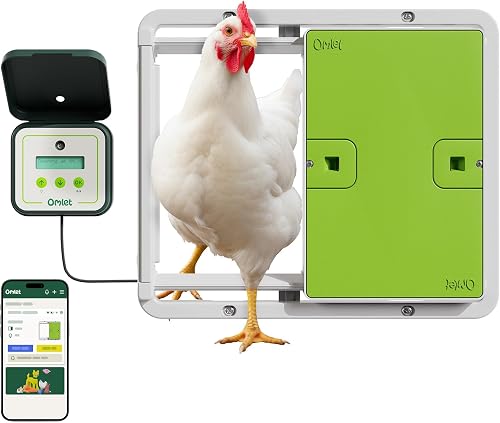
- Wi-Fi and app control
- Light sensor or timer
- Battery or plug-in power
- Built-in safety sensors
The Smart Wi-Fi version adds app control and notifications to Omlet's light-sensor or timer options. It may fit keepers who want remote access and can provide Wi-Fi at the coop.
Pros
- App control and notifications
- Light-sensor or timer modes
- Battery or wired power options
- Built-in safety sensors
Cons
- Wi-Fi use needs a suitable connection
- The 12V power cable is sold separately
The Omlet Smart Wi-Fi version adds app control and notifications to the Omlet light-sensor and timer options. Omlet says it works with Alexa and Google Home, and offers battery or plug-in power; the 12V cable is sold separately.
Does the door suit your coop and climate?
Omlet says its casing is waterproof to IPX6 standards and that the door was tested to work down to -4°F. Those are manufacturer statements, so consider your local weather and follow the installation instructions for protecting the control panel and cables.
Omlet says the door works with wooden coops and can attach directly to its Eglu Cube and Eglu Pro large plastic coops. If you have a different plastic coop, hardware cloth or another material, confirm the right mounting method before starting.
The door can improve coop security by closing on a schedule, but it cannot secure gaps elsewhere in a coop or run. Check the rest of the enclosure, latches and mesh as part of your setup.
A door also needs to match the coop’s daily layout. Make sure the path stays clear and the opening is comfortable for your birds.
Our backyard chicken coop guide covers coop, run and door planning together.
What are the main trade-offs?
The Omlet’s strengths are two operating modes, built-in safety sensors and flexible mounting direction. Its standard version keeps control local, which makes it less suitable if you want to check or change the door’s status from a phone.
The 4 AA batteries aren’t included, and Omlet’s stated 6-month battery life means you should include battery checks in your routine. The door’s frame size also calls for measuring before purchase rather than assuming it will fit an existing opening.
The Smart Wi-Fi model may be a better fit for keepers who want app control. The Run-Chicken T50 is another option if you want app, timer and light-sensor controls with a rechargeable battery.
Is the Omlet Automatic Coop Door a good choice?
The Omlet Automatic Coop Door is a good match for a wooden coop with room for its frame and a keeper who wants light-sensor or timer control. Its safety sensors and left-or-right mounting give you useful setup options.
Choose the standard Omlet if a local control panel is enough. Choose the Smart Wi-Fi model for app access, or compare the best chicken coop door openers if you want to weigh more options before deciding.
Frequently asked questions
Does the Omlet Automatic Coop Door use a timer?
Yes. The Omlet Automatic Coop Door can use a light sensor to open at dawn and close at dusk, or a timer for chosen opening and closing times.
Pick the mode that fits your routine, then confirm the door's schedule and movement after installation.
Does the Omlet Automatic Coop Door need batteries?
The standard Omlet Automatic Coop Door runs on 4 AA batteries, which are not included. Omlet states a 6-month battery life.
Check the control panel regularly and keep spare batteries available if you rely on the door to follow its schedule.
Can the Omlet Automatic Coop Door fit a wooden coop?
Omlet says the door works with wooden coops and can be fitted to open left or right. Measure the opening and available mounting area first, then check the installation instructions for your coop material and layout.
What is the difference between the Omlet door and Smart Wi-Fi version?
The Smart Wi-Fi version adds app control and notifications, while both versions offer light-sensor or timer control and built-in safety sensors. The Wi-Fi model can use 4 AA batteries or a wired connection; its 12V power cable is sold separately.


